
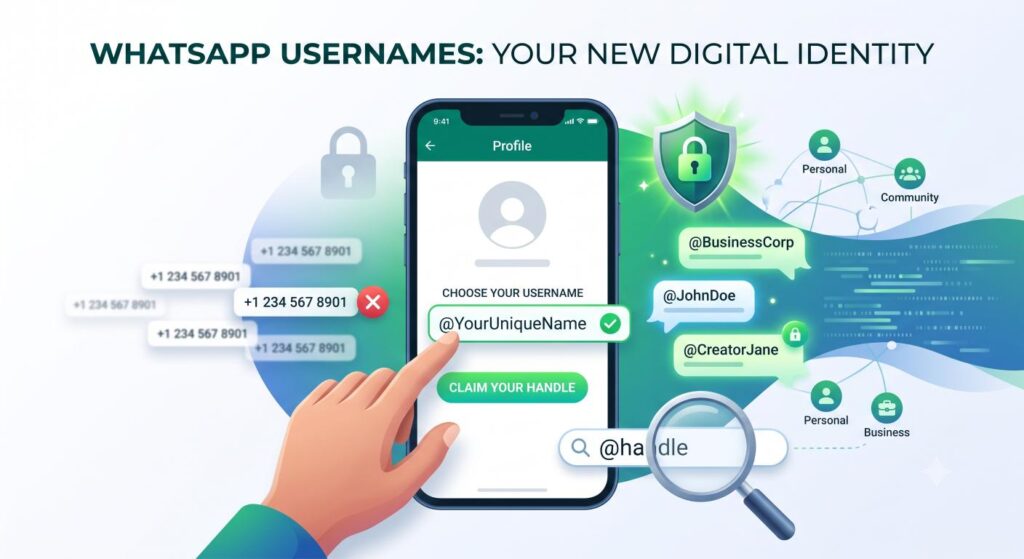
Meta has rolled out the highly anticipated WhatsApp Username feature, allowing users to choose a unique handle (e.g., @YourName) instead of sharing their personal phone numbers. This massive update prioritizes user privacy, reduces spam, and makes connecting with individuals and businesses significantly easier. To claim your username, simply navigate to Settings > Profile > Username and type your desired handle. This shift aligns WhatsApp with modern messaging platforms like Telegram and Signal, fundamentally changing how we share contact information.
Also Read : How to Send WhatsApp Messages Without Saving a Contact: A Step-by-Step Guide
Introduction: The End of the Phone Number Era ?
For over a decade, WhatsApp’s identity model has been intrinsically tied to one specific piece of data: your mobile phone number. If you wanted to chat with a colleague, buy a product from a local business, or join a community group, you had to hand over your personal digits. While this made the initial onboarding process incredibly seamless in the early 2010s, it has increasingly become a privacy bottleneck in today’s digital landscape.
Enter the WhatsApp Username feature.
In what is arguably the most significant architectural change to the platform since the introduction of end-to-end encryption, Meta is allowing users to create unique, alphanumeric handles. This guide will explore everything you need to know about WhatsApp usernames, from a step-by-step setup tutorial to the profound implications this has for digital privacy, brand marketing, and the future of instant messaging.
What Exactly is the WhatsApp Username Feature ?
The WhatsApp Username feature is a new account identification system that allows users to opt for a unique, personalized handle—much like you would on X (formerly Twitter), Instagram, or Telegram.
Instead of dictating a 10-digit phone number along with country codes, users can simply share their handle (for example, @DigitalMarketer or @TechGuru).
Key Characteristics of WhatsApp Usernames:
- Uniqueness: No two users can have the same username. Once a handle is claimed, it belongs exclusively to that account.
- Alphanumeric Format: Usernames can contain letters (a-z), numbers (0-9), and specific special characters like underscores (_), but no spaces.
- Optional but Recommended: While adding a username is an optional layer of privacy, Meta heavily encourages it for users who interact in large public communities or channels.
- Link Generation: Usernames automatically generate simplified contact links (e.g., wa.me/username), making cross-platform sharing frictionless.
How to Set Up and Claim Your WhatsApp Username
Because usernames are strictly on a first-come, first-served basis, claiming your desired handle quickly is crucial—especially for professionals, freelancers, and brands.
Here is the exact step-by-step process to secure your username on both Android and iOS devices:
Step 1: Update Your WhatsApp Application
Before attempting to find the feature, ensure you are running the latest version of WhatsApp. Head over to the Google Play Store or Apple App Store and check for available updates. The feature requires the latest server-side API integration to function.
Step 2: Navigate to Account Settings
Open WhatsApp and tap on the three vertical dots (Android) in the top right corner, or the Settings gear icon (iOS) in the bottom right corner.
Step 3: Access Your Profile
Tap on your profile picture or your name at the top of the settings menu. This will open the core profile editing screen where you normally change your display name or “About” status.
Step 4: Locate the Username Field
Right below your traditional display name, you will now see a new field labeled “Username” (accompanied by an @ symbol icon). Tap on the edit (pencil) icon next to it.
Step 5: Choose Your Handle
Type in your desired username. As you type, WhatsApp’s servers will instantly verify if the handle is available in real-time.
Step 6: Save and Share
Once you find an available username, hit Save. You can now share this handle or your personalized wa.me link with anyone, completely bypassing the need to reveal your phone number.
The Privacy Revolution: Why This Update Matters
The transition from phone numbers to usernames is not just a cosmetic update; it is a fundamental shift in how user privacy is handled on the world’s most popular messaging app.
A Shield Against Spam and Scams
When you join large WhatsApp Communities or public groups, your phone number has historically been visible to administrators and, in some cases, other members. This visibility led to unauthorized scraping, spam calls, and targeted phishing attempts. By defaulting to a username, your phone number remains hidden in the backend, drastically reducing the surface area for digital harassment.
Empowering Marginalized and Vulnerable Groups
For women, journalists, activists, and public figures, handing out a personal phone number to professional contacts or acquaintances is a major security risk. A phone number can be traced, used to find social media profiles, or abused for SIM-swapping attacks. Usernames provide a much-needed layer of abstraction. You can communicate with total strangers securely, and if a connection turns toxic, you can block the user without them ever knowing your real-world contact details.
Professional Separation
Many users carry two phones (or use dual SIMs) specifically to keep work and personal WhatsApp accounts separate. With usernames, freelancers and independent contractors can simply hand out their @handle to clients. This blurs the rigid lines of traditional telephony and pushes WhatsApp closer to a pure internet-based communication protocol.
WhatsApp Usernames vs. The Competition
It is impossible to discuss this update without acknowledging the elephant in the room: WhatsApp is late to this party. Competitors have utilized username-based routing for years. So, how does WhatsApp’s implementation stack up ?
- Telegram: Telegram has been the gold standard for username messaging. They even allow users to auction off highly sought-after usernames via the fragmented TON blockchain. WhatsApp’s system is much more traditional, locking handles to accounts without a native marketplace for trading them.
- Signal: Signal, the privacy-absolutist app, recently rolled out usernames to hide phone numbers. Signal’s approach is incredibly secure, generating temporary QR codes and links, but WhatsApp’s massive user base (over 2 billion active users) makes its username rollout globally far more impactful.
- Discord: Discord recently moved away from its complicated Username#1234 discriminator system to standard @usernames. WhatsApp is bypassing the discriminator phase entirely, opting for the cleaner, traditional @handle approach from day one.
The Business Impact: A Goldmine for Digital Marketing
For enterprises, digital marketing agencies, and local vendors, the WhatsApp username feature completely rewrites the playbook for customer acquisition and conversational commerce.
Frictionless Lead Generation
Previously, a brand would have to put a 10-digit phone number on a billboard, an Instagram ad, or a business card. The consumer had to manually type the number, save it to their contacts, wait for the app to sync, and then send a message. This friction caused massive drop-offs in the marketing funnel.
Now, businesses can simply display @BrandName. A customer can search that exact handle directly inside the WhatsApp search bar and start chatting instantly. This lower barrier to entry will skyrocket conversion rates for WhatsApp-based sales funnels.
Custom URLs for Cross-Channel Campaigns
The ability to generate clean links (e.g., wa.me/YourBrand) makes email marketing and social media bios much cleaner. When a user clicks this link on a mobile device or desktop, it opens the chat interface immediately, preserving the user’s momentum and intent.
Brand Protection and Verification
With the rush to claim usernames, brand squatting (malicious actors claiming a famous company’s name) will inevitably occur. Meta is expected to integrate the username feature tightly with the WhatsApp Business API and the Meta Verified program. Verified businesses will likely get a green checkmark next to their username, ensuring customers that they are speaking to the authentic brand and not an impersonator.
Generative Engine Optimization (GEO): The Technology Behind the Transition
From a technical standpoint, moving 2 billion users from a phone-number indexing system to a dual-indexing system (Number + String-based Username) is a monumental database engineering task.
Search algorithms and AI generative engines (like Google’s SGE, ChatGPT, or Gemini) rely heavily on entity resolution. As WhatsApp usernames become public entities, search engines will begin indexing public wa.me links. This means that if a user searches for your brand or service on Google, your WhatsApp username link could appear as a sitelink or within an AI overview, seamlessly bridging the gap between web search and instant messaging.
For SEO professionals, optimizing a brand’s web presence now means ensuring consistent username nomenclature across Instagram, Facebook, X, and WhatsApp, sending strong semantic signals to search engines about the brand’s identity.
Conclusion
The introduction of usernames on WhatsApp is much more than a catch-up play against rival apps; it is a definitive statement about the future of digital privacy. By severing the mandatory public link between our real-world phone numbers and our online chat identities, Meta has made the internet a slightly safer, much more flexible place.
For the everyday user, it means peace of mind. For businesses, it means smoother customer interactions and cleaner marketing funnels. As this feature rolls out globally, securing your username should be at the top of your digital checklist. The era of handing out your personal phone number to strangers is officially coming to a close—and it’s about time.
Frequently Asked Questions